
LaunchBay breadth
A broader portal for onboarding, tasks, forms, client communication and automations.
ClientProof vs LaunchBay
LaunchBay is a broad client onboarding and portal platform. ClientProof is a focused client delivery and exact-version approval product. Both support loginless client access; the right choice depends on workflow breadth.
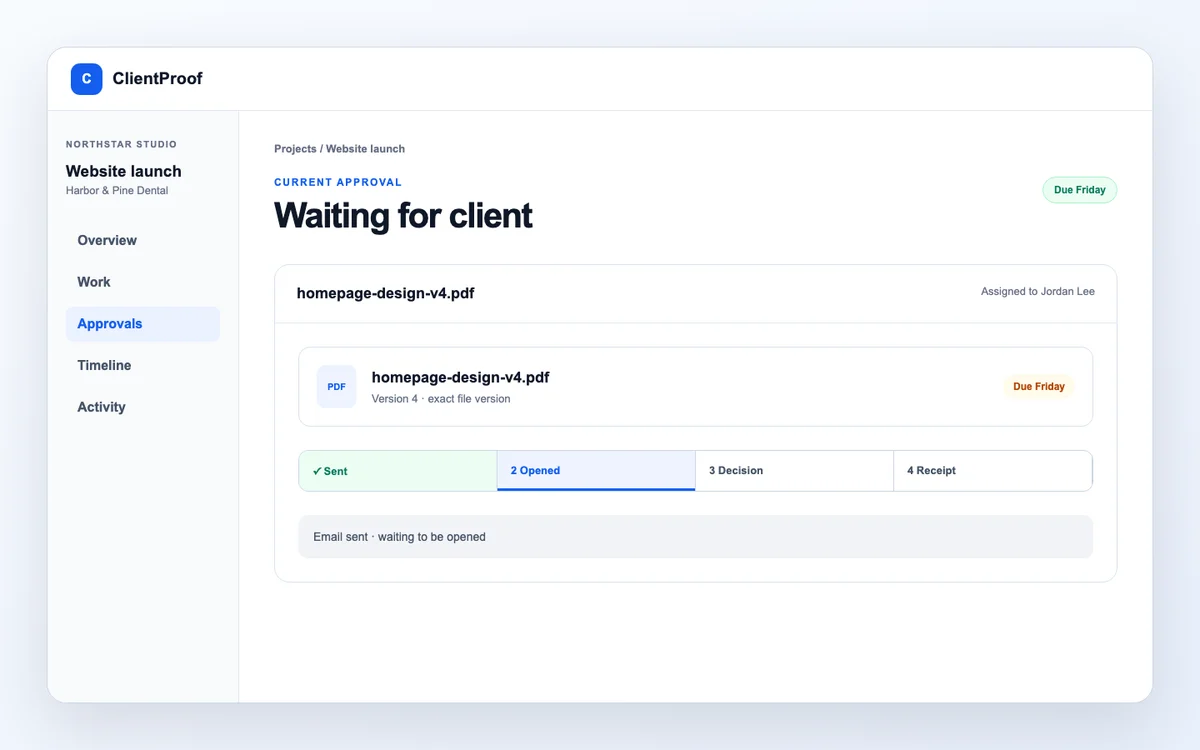
What changes
ClientProof keeps the public project context, private review action, and retained decision record distinct—so clients know what to read and what to do.
A broader portal for onboarding, tasks, forms, client communication and automations.
A delivery layer for status, files and exact-version decisions.
LaunchBay uses magic links by default; ClientProof does not require a client account.
Evaluation path
The products overlap at client access but differ substantially in scope.
Decide whether the client must onboard and work in a portal or mainly review delivery.
Open each client experience from a fresh browser and mobile device.
Send a real deliverable and inspect how the exact version and reviewer are recorded.
Include billing model, administration, automation and evidence needs.
Current comparison
LaunchBay claims below are based on its current official portal, magic-link and pricing pages—not the older Motion.io product position.
| Need | ClientProof | LaunchBay |
|---|---|---|
| Loginless client access | No ClientProof account | Magic links are the default |
| Project status and shared files | Core delivery workflow | Included in the broader portal |
| Exact-version approval receipt | Core differentiator | Verify current proof export and decision evidence for your use case |
| Forms, contracts, payments, tasks | Outside the focused scope | Broader native workflow |
| Pricing shape | $19 monthly or $190 yearly Pro; no per-seat fee | Current plans are priced per team member |
| Best fit | Focused agency delivery and approval | Client onboarding and operations consolidation |
Best fit
A wider platform is not automatically better; a focused product is not automatically enough.
You already have internal tools and need a cleaner client delivery, decision and receipt layer.
Best for: Agencies optimizing exact-version sign-off
You want client onboarding, tasks, forms, contracts, payments, messages and automation in one portal.
Best for: Teams consolidating broader client operations
Run the same client journey in each product and compare setup, client action and retained evidence.
Use the evaluation guidePlan names, feature limits and security options change. Reconfirm important requirements before purchase.
Know before you start: This comparison is a workflow guide, not a substitute for vendor terms.
Buyer questions
These answers describe the product as it works today. They do not assume features that are not in the current ClientProof code.
No by default. LaunchBay's current official documentation says client portals use loginless magic links by default, with password-protected access available as an option on higher plans.
Yes. The vendor announced that Motion.io became LaunchBay in December 2025. This page keeps the Motion.io URL because that is how many buyers still search, but evaluates the current LaunchBay product.
ClientProof Pro is currently $19 per month or $190 per year without per-seat pricing. LaunchBay currently uses per-team-member plans. Verify both pricing pages before purchase because SaaS pricing can change.
No. Clients can open the shared project page and private review links without creating a ClientProof account. A formal decision is confirmed by a code sent to the assigned reviewer email.
No. It is operational approval evidence: the exact file version, assigned reviewer, decision, timestamp, verification method and receipt reference. It is not presented as a digital signature or contract.
Start with one real project
Pilot ClientProof on one active project free and judge the client link, exact-version decision and receipt against your current portal workflow.